It’s the middle of the night. Production needs timely attention. Our engineer needs temporary access, the approver is asleep, and someone suggests using the admin account we kept kicking around “just in case.” By morning, the service is healthy. The access is still there.
When it comes to securing identities and managing access across cloud infrastructure, the built-in identity and access management (IAM) tools from AWS (Amazon Web Services), Microsoft Azure, and Google Cloud Platform (GCP) are powerful. They give us granular permissions, federation, temporary credentials, and increasingly capable governance controls.
But powerful controls still need a coherent operating model, especially when an environment spans more than one cloud provider.
We need to know who can do what, why they can do it, how they obtained that authority, and what happens when we take it away. Preferably without assembling a small archaeological expedition.
So, here’s our minimal-fluff, gloves-off cloud providers IAM comparison, updated for 2026, and how we at Trustle can help clean up the spaghetti.
The cloud multiverse: what are we actually comparing?
Before comparing features, we need to compare equivalent layers.
AWS IAM controls access to AWS resources. IAM Identity Center centralizes workforce access across AWS accounts and supported applications. Microsoft Entra ID provides identity services, while Azure role-based access control (RBAC) governs access to Azure resources. Google Cloud IAM governs permissions across Google Cloud; Google Workspace is a separate productivity and administration environment.
Treating those names as interchangeable makes a comparison wonderfully simple and technically unhelpful.
Four questions keep us honest:
- Authentication: Which person or workload is making the request?
- Authorization: What actions can that identity perform on which resources?
- Privileged access: Under what conditions can it obtain elevated permissions?
- Governance: Who owns the access, reviews it, and removes it?
The distinction between authn vs authz, or authentication versus authorization, matters here. Successfully signing in doesn’t establish that every subsequent permission is appropriate.
The Cloud Security Alliance’s July 2026 guide to IAM standards and protocols separates authentication, authorization, provisioning, and governance functions. Shared standards help systems exchange identity information. They don’t automatically make different cloud permission models equivalent.
A successful single sign-on is a useful beginning. It isn’t the end of the access conversation.
Cloud providers IAM comparison at a glance
The useful comparison is how each platform implements access and what we still need to configure, connect, and verify.
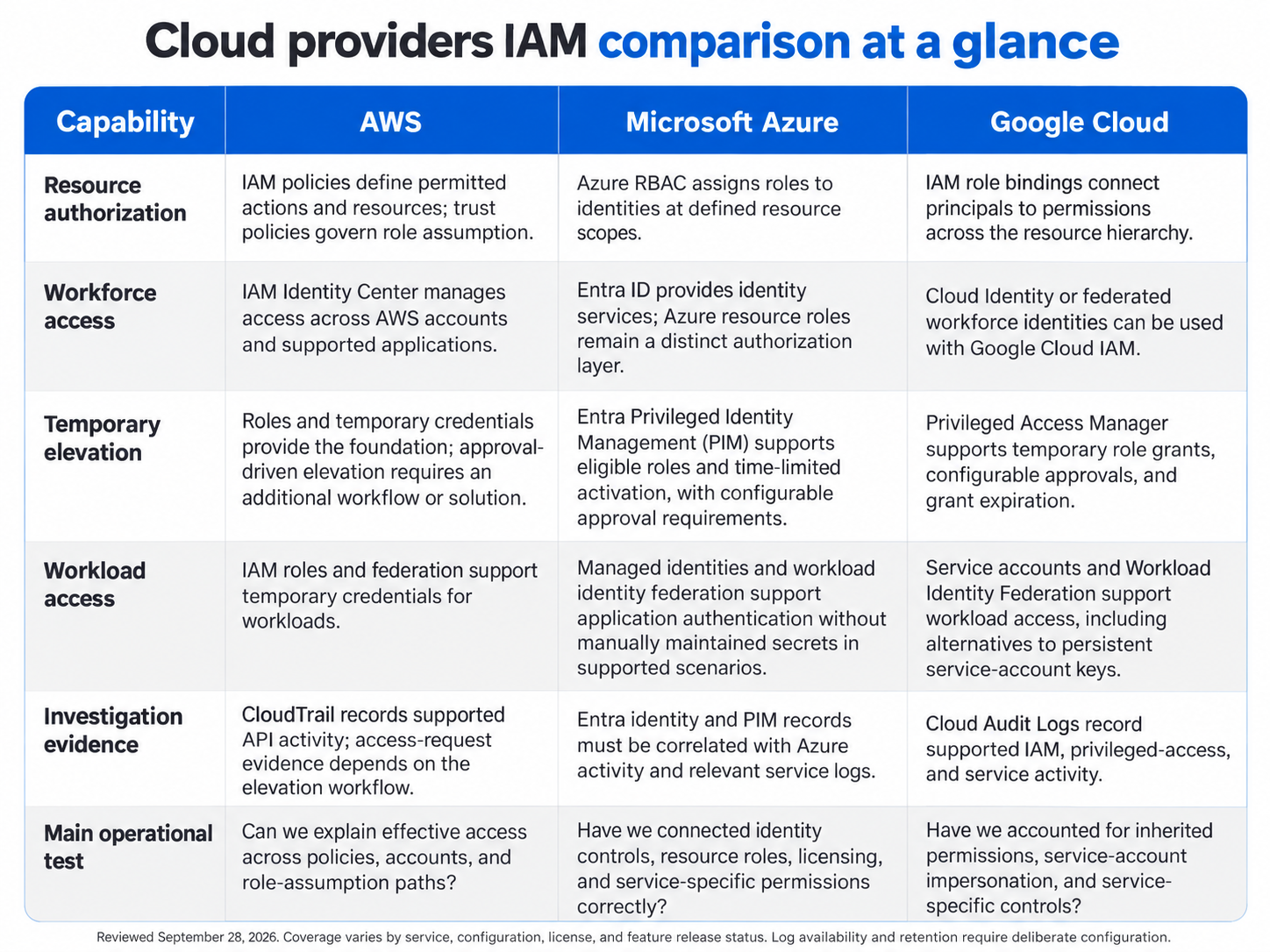
A feature appearing in the console doesn’t mean it covers every resource. Nor does “included” mean “configured.” Those are expensive assumptions dressed as shortcuts.
AWS IAM: granular control, with policy engineering attached
AWS IAM gives organizations granular control, right down to individual application programming interface (API) actions. There are policies, users, roles, groups, and service-linked identities for days.
It’s also famously unforgiving. Misconfigure a trust policy, and we can block a legitimate workload or invite the wrong principal to assume a powerful role.
IAM Identity Center adds centralized workforce access and permission sets across AWS accounts. That deserves proper credit: AWS does provide multi-account management. Describing it as having no centralized visibility or automation misses the point.
The challenge is understanding how the pieces combine.
An identity policy, a resource policy, a permissions boundary, and an organization-level restriction play different roles. A role’s name tells us considerably less than its effective permissions and the paths available to reach it.
AWS Security Token Service (STS) issues temporary credentials. Those credentials reduce reliance on persistent keys, but they don’t automatically create a business approval process. Approval-driven elevation needs an additional workflow, whether that’s a maintained implementation or an integrated product.
Our test for least privilege in AWS should therefore cover both direct permissions and delegation: can this identity assume another role, pass a powerful role to a service, or change a policy that expands its own access?
“ReadOnlySomething” isn’t an assurance. It’s a name someone typed.
Azure IAM: identity governance with several moving parts
Microsoft Entra ID takes a more enterprise-y approach. Integration with Microsoft 365, Conditional Access, and PIM makes it a natural fit for organizations already neck-deep in the Microsoft ecosystem.
It’s powerful, but in that “more knobs than we’ll ever need” kind of way.
The important distinction is between Entra directory roles and Azure resource roles. Managing identities and administering cloud resources involve different permissions. We should also distinguish a role that’s eligible for activation from one that’s permanently active.
PIM supports time-limited elevation with configurable controls such as approval, justification, and multifactor authentication (MFA). Those capabilities give us a useful foundation for privileged access management, provided we configure the appropriate role scope and activation rules.
Licensing belongs in the comparison, too. We need to verify which governance capabilities our subscriptions cover and who requires a license.
One naming trap needs retiring along with the product: Microsoft Entra Permissions Management is no longer a current offering. Independent analyst Directions on Microsoft confirmed its retirement in its February 2026 update on Entra Permissions Management’s lifecycle. That doesn’t mean PIM or Entra ID Governance disappeared.
For our practical test, activate the intended role, perform the authorized task, and verify what happens after expiration. Include the application or data service involved. The identity console alone doesn’t tell the entire story.
Google Cloud IAM: resource hierarchy, federation, and native elevation
Google Cloud IAM organizes access through roles and policy bindings across organizations, folders, projects, and supported resources.
That hierarchy is useful. It also means a project-level review can miss permissions inherited from above. Tidying the downstairs cupboard doesn’t resolve what’s leaking through the ceiling.
Google Cloud’s Privileged Access Manager provides native temporary elevation. We can define eligible requesters, roles, maximum duration, and approval requirements. Successful grants provide temporary permissions, which the service removes when the grant ends.
That’s a meaningful capability, and a current comparison should acknowledge it.
We still need to check supported resources, role coverage, and access-change propagation. Some advanced approval and scope-customization capabilities have separate availability or subscription conditions; they shouldn’t be treated as universal defaults.
Service-account impersonation deserves particular attention. An identity may have limited direct permissions while retaining the ability to act as a more privileged service account.
The practical question is whether we can explain every relevant route to the resource: direct bindings, inherited permissions, group membership, and impersonation.
Google Cloud isn’t merely the beginner-friendly option in this comparison. Its governance requirements deserve the same serious scrutiny as everyone else’s.
Just-in-time access: the timer is only part of the job
Temporary credentials, temporary role assignments, and zero standing privileges describe related but different things.
A credential can expire while the identity remains entitled to obtain another one. A privileged role can be time-limited while some other standing permission provides equivalent access. An approval can expire without proving that every downstream session has ended.
We need to test the whole sequence:
Request → approval → activation → authorized activity → expiration or revocation → verified denial.
The National Institute of Standards and Technology (NIST) addressed token risks directly in its September 2026 publication, Protecting Tokens and Assertions from Forgery, Theft, and Misuse. Its guidance makes token protection and management part of the access-security conversation.
Our implementation test should ask what happens to already-issued credentials, refresh mechanisms, cached permissions, and active application sessions. The answer depends on the system and the type of access.
Removing a grant is an administrative action. Demonstrating that the next unauthorized operation fails is evidence.
We should record both.
Test the controls against production, pipelines, and sensitive data
A useful cloud IAM comparison should survive contact with an actual workload. Three exercises reveal more than another page of feature checkmarks.
Production troubleshooting. An engineer needs to inspect a failing service and restart one component. We should grant the necessary scope for a defined window, record the justification, and verify expiration. If the approver is unavailable, the emergency route needs an owner, monitoring, and a review afterward.
The acceptance test: the repair succeeds, unrelated administrative actions fail, and elevated access ends as designed.
Deployment pipelines. A continuous integration and continuous delivery (CI/CD) pipeline needs to publish an application. Evaluate a workload identity or federation approach that avoids a persistent secret where supported.
Then examine the trust conditions. Which repository, execution environment, or other supported identity attributes qualify for access? Can an unauthorized job obtain the same authority?
The acceptance test: the intended deployment works, while an untrusted execution context doesn’t.
Sensitive-data troubleshooting. An engineer needs to diagnose a failed data pipeline. That doesn’t necessarily require unrestricted access to customer records.
Separate infrastructure administration, job execution, dataset reads, exports, and decryption. Check service-specific permissions and any applicable row- or column-level controls. Include temporary result files and output destinations.
The acceptance test: we can fix the pipeline without acquiring broader data access than the task requires.
These exercises also expose operational costs: approval delays, policy maintenance, logging requirements, and the engineering needed to keep everything working. “Free IAM” can still come with a substantial calendar invitation.
Workload identities and AI agents need an owner, too
Human access is only part of the inventory. Applications, deployment tools, service accounts, and artificial intelligence (AI) agents also need authority to get things done.
Our service account security approach should establish an owner, a business purpose, permitted resources, and a workable revocation path. Replacing a persistent key with a short-lived credential is useful, but we still need to constrain what the identity can do.
AI agents add a delegation question: whose authority is the agent exercising, and how far does that authority travel?
NIST’s February 2026 concept paper on software and AI-agent identity and authorization identifies delegation, identity attribution, and logging as areas for investigation. It’s a proposed research direction, not a finalized compliance checklist.
For our own deployments, we should be able to identify the agent, its owner, its authorized task, and any human approval behind a sensitive action. We should also test what happens when the agent requests an action outside that scope.
A shared service account with broad permissions makes those questions harder to answer. Giving it a charming name doesn’t improve attribution.
Multi-cloud IAM: where consistent intent meets different permissions
Cloud providers support common federation standards, but authorization still needs provider-specific implementation.
That’s the difficult part of multi-cloud security: maintaining a consistent access policy while preserving the details that make each environment behave differently.
NIST’s August 2026 initial public draft on multi-cloud architecture challenges identifies mismatches across identity, telemetry, configuration, data protection, and security assurance. It’s a draft analysis, rather than a prescribed architecture, but the operational problem will feel familiar.
Consider a contractor who has access through a federated group, a direct cloud assignment, and a separate application account. Ending the contract should trigger a review of every relevant path.
That’s why deprovisioning needs verification beyond disabling the central identity. We should check residual assignments, independent credentials, delegated authority, and active sessions as appropriate to each system.
The same discipline applies during investigations. We need to connect the requester, approver, activated role, resource activity, and containment action. Log collection helps; usable identity correlation is what turns those records into an explanation.
And if the identity provider becomes unavailable, our emergency access process must still work. That’s something to test while everyone is awake.
A cloud IAM evaluation checklist that earns its keep
The Federal Cloud Identity Playbook’s 2026 edition reinforces the need for an enterprise approach to cloud identity and customer ownership of access controls. Its scope doesn’t include privileged access management, so we should use it for operating-model context rather than as a privileged-access specification.
For a practical evaluation, ask each platform and any additional management layer to demonstrate the following:
- Effective access: Explain direct, inherited, and delegated permissions for a representative identity.
- Controlled elevation: Show eligibility, approval rules, permitted scope, and maximum duration.
- Verified withdrawal: Measure the interval between a containment decision and confirmed denial of the targeted access.
- Workload ownership: Identify who owns each tested non-human identity and why it exists.
- Investigation evidence: Reconstruct a privileged operation from request through resource activity.
- Lifecycle coverage: Demonstrate how a role change or departure removes relevant access.
- Emergency operation: Test access during an identity-service outage and review its use afterward.
- Operating cost: Account for licenses, logs, integrations, policy maintenance, and on-call support.
Track a few measures consistently: permanently assigned privileged access, identities without owners, time to verified revocation, and time to reconstruct a privileged action.
Those numbers describe our environment. They’re considerably more useful than announcing that our cloud has achieved “enterprise-grade security,” then hoping nobody asks a follow-up question.
Essential extras: where Trustle fits
Trustle acts as a unifying layer across providers, bringing identity and entitlement information together across connected systems.
It doesn’t replace AWS IAM, Microsoft Entra, or Google Cloud IAM. It helps us manage access across them.
Think of it as adding a common access-management layer to scattered identity infrastructure: somewhere to review permissions, identify unnecessary access, and coordinate workflows without losing our minds.
Take just-in-time access as an example. Trustle supports request-and-approval workflows through Slack or Microsoft Teams, with access granted for a defined window. That gives teams a consistent way to obtain temporary permissions across supported integrations.
Trustle also helps surface unused or excessive permissions and supports identity lifecycle automation where connectors provide that coverage. We can spend less time on Excel exports and late-night messages asking, “Does anyone know who this user is?”
That’s the practical value of cloud infrastructure entitlement management: connecting visibility to decisions about which permissions should exist, who should hold them, and when they should end.
We still need to validate connector scope, downstream behavior, and evidence in our own environment. Native enforcement and service-specific controls remain part of the design.
A useful cloud provider's IAM comparison should leave us with more than a preferred dashboard. It should help us build an access model we can explain, operate, and test.
Then the next time production needs attention at 2:13 a.m., we can fix the service without leaving a permanent souvenir in the permissions.
Put our cloud access model to the test
Start the Trustle free trial to uncover excessive permissions across connected cloud environments and try approval-based, time-limited access. Let’s get production fixed without leaving admin rights behind.